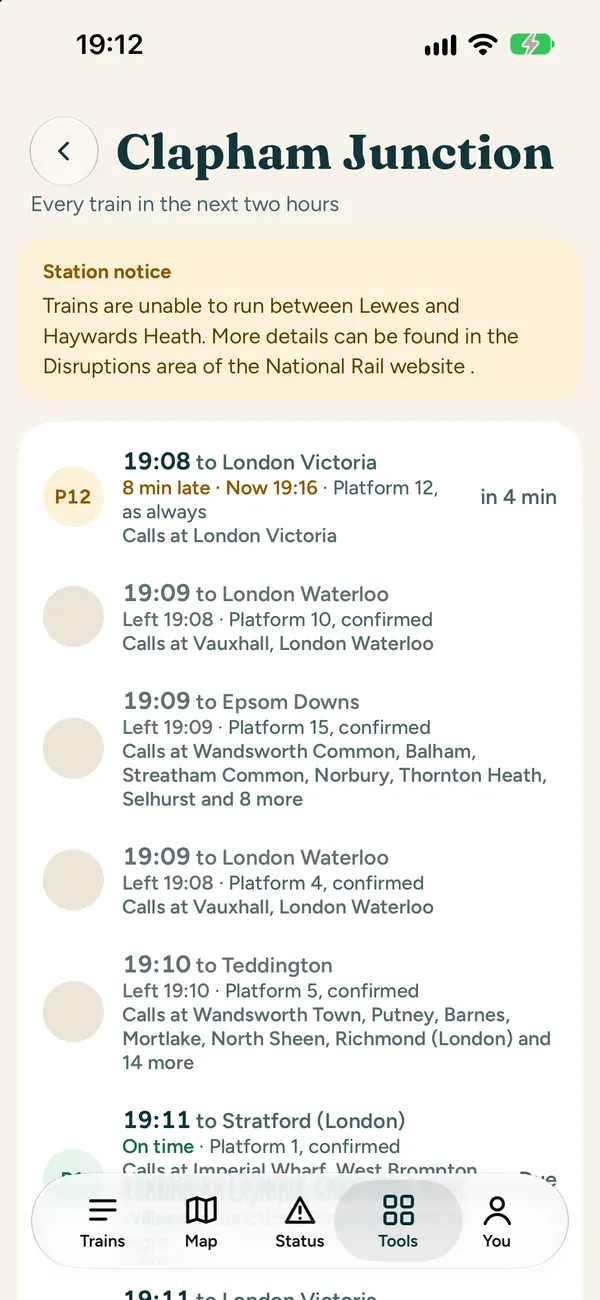
Other train apps make you search for your journey every time. Kettle already knows it. Open it and your train is there: live times, the platform and when you’ll get in.
Free for every normal day. Premium, for the bad ones, is £1.99 a month with 7 days free. You sign in with your email: there’s no password.
I had every part of my commute down to the minute, except the train!
I knew the drive to the station, the best bit of the car park, and exactly how long it took to cycle to my desk, but a late train or a cancellation could still cost me the first meeting of the day, or bath time with the kids. So I built Kettle.
Choose your stations and usual travel time once. Kettle shows your next trains whenever you open it.
1
Choose your stations
Tell Kettle your two stations and when you usually travel. It remembers them, morning and evening.
2
See your trains
Open Kettle and your next trains are already there: live times, the platform and when to leave. Nothing to search for.
3
Get help when plans change
Late, cancelled or a blocked line? Kettle shows what’s happening on your line. With Premium it alerts you, has another way round ready and lists the Delay Repay you could claim.
Why Kettle
Built for the journey you make every day.
Journey planners are built to answer any trip. Kettle is built around the one you make every day.
Open it and see how your trains are running. No stations to search for.
See how your trains ran, without another search.
On the train, see how it’s running, where it is and when you’ll get in.
Get to know your regular train: how well it really runs, so you know what to expect.
And for the bad days, Kettle Premium adds three more.
Which train to catch Premium
Know which train really gets you in on time.
Tell Kettle what time you need to be at work, and it names the latest train that gets you there 9 days out of 10. It’s based on how your trains have actually run, not the timetable. If a train was cancelled, it counts the wait for the next one.
One chart of the trains around your usual time: when each is due in, and when it really gets in.
Patterns worth knowing, like a train that’s usually late. We only mention one when it’s unlikely to be chance.
Choose the period, from last week to all time, and see how your trains run by day of the week and by hour.
On the free plan you see the headline: how often your trains are on time, and how often they’re cancelled or 15 or more minutes late.
Your way round Premium
When your line is blocked, find another way round.
Pick a route that avoids your usual line when it’s blocked. When your line has trouble, Kettle adds it to your train cards in blue, with live times: which trains, where to change and how long it takes, plus a small map.
If you haven’t picked one, Kettle offers to when trouble starts.
Not every journey has another way round. If Kettle can’t find one, it tells you.
Your ticket may not be valid on another route, so check before you travel.
Delay Repay Premium
See the money you could claim back.
Kettle lists every train on your route from the last 28 days that got in 15 minutes or more late, or didn’t get there at all: what you could claim, the deadline, and a link to the train company’s claim page.
You make the claim. Kettle can’t tell which trains you were on, so claim only for journeys you made.
Track a train and Kettle tells you when it’s one you could claim for, then reminds you before the deadline.
Try it on your own route.
Free on iPhone and Android, and in any browser. Premium comes with 7 days free, and you can cancel any time.
Tell Kettle what you need and it checks every journey for you: whether your stations and your change are step-free, and whether staff are there to help when you get on and off.
A step-free mark beside each station, so you can see at a glance which are step-free, step-free to some platforms only, or not at all.
A note on your train card when a station or change on that journey isn’t fully step-free, or no staff will be there to help when you arrive.
When each station has staff to help, and the number to book Passenger Assist.
Real screens from Kettle on real journeys across Great Britain, from the iPhone app, the Android app and the web app.
Wherever you commute
Audley End → Liverpool StreetThe iPhone app in dark mode: the day’s trains as a bar, and every stop on the next one.Glasgow Queen Street → EdinburghEvery train on your route, as cards you can swipe.Woking → London WaterlooRunning late? It says by how much, and why. Here in dark mode.Birmingham New Street → CoventryA confirmed platform, and the train you usually catch.Cardiff Central → Bristol Temple MeadsThe platform it usually leaves from, before it’s announced.
On Android
Manchester Piccadilly → StockportYour next trains as cards, with how late each is running and its platform.Leeds → YorkWhen buses replace trains, where the bus leaves from.Birmingham New Street → CoventryWhat’s happened on your line, and each train company’s service.Audley End → Liverpool StreetPremiumThe trains you could claim Delay Repay for, with each deadline.
Ahead of the bad days
A hot day on your linePremiumHow your line copes when it’s this hot, and the hot hours on the day’s bar.The outlookPremiumThe next three days on your line, from how its trains ran on days like them.Match nightsPremiumFootball at a ground on your line, and which trains the crowds will be on.Coming up on your lineOn Status, and a notification the evening before with Premium.
Inside the app
Which train to catchPremiumThe latest train that gets you in on time 9 days in 10.Your way roundPremiumA route that avoids your usual line, ready for bad days.Track this trainPremiumAlerts if it’s late, and a way to tell someone who’s waiting. Tracking itself is free.A train’s detailsEvery stop, the platform, and what passengers on board report.How today wentEvery train on your line today: on time, late or cancelled.Line statusDisruption on your line, plus the Tube, DLR and Overground.DeparturesA live board for any station in Great Britain.Delay RepayPremiumThe trains you could claim for, and the deadline for each.Live mapEvery line coloured by how it’s running. Trains moving on it with Premium.
Beyond the phone
Live ActivitiesPremiumYour train on your iPhone’s Lock Screen: when to leave, then how far it’s got.Apple WatchPremiumYour next trains and their platforms, on your wrist.WidgetsBigger ones PremiumYour trains on your Home Screen and Lock Screen, small, medium or large, kept up to date.CarPlayThe last two trains and the next two, on your car’s screen with CarPlay on iOS 26: glance, nothing to tap.
Free for every normal day. Premium to deal with the bad ones.
New subscribers get 7 days free. Got a code? Use it in the app.
Free
£0
Live trainsEvery train on your route, as cards you can swipe.
PlatformsConfirmed, announced, or the one it usually uses, and we always say which.
Track your trainsJust today’s, or your regular train, marked on your cards with live progress once you’re on board.
Share your journeySend a link so someone can follow your train, no app needed.
Line statusDisruption and planned works on your line, plus local transport in London, Manchester, Sheffield and Liverpool.
Any stationLive departures and station info, wherever you’re going.
Quick checkThe trains between any two stations, as a list, without changing your route.
Live mapEvery line in Great Britain, coloured by how it’s running.
Passenger reportsWhat people on your train are saying, a way to add your own, and which trains are usually crowded.
Commutes with a changeYour train, then the best connection on, with a warning if a late train means you’ll miss it.
Widgets and CarPlayYour next train on your iPhone’s Home Screen and Lock Screen, and in CarPlay, kept up to date without opening the app. Bigger widgets, and Trains around now in CarPlay, come with Premium.
Accessible travelWhich of your stations are step-free, and a note on your train card when a station or change isn’t, or when no staff are there to help.
Replacement busesWhen buses replace trains, where they leave from at your station. Look up any station.
Trains that divideWhen your train splits on the way, which coaches to be in.
Weather on your lineHeavy rain, strong winds, snow, ice, heat or fog marked on the day’s trains, and Met Office warnings.
One of eachOne route, one watched station and one person to follow.
Premium
£1.99 a month or £14.99 a year · 7 days free
Everything in Free, plus:
Which train to catchThe latest train that gets you in on time 9 days out of 10, from how your line really runs, counting the walk at the other end.
Your way roundAnother route, ready in your cards when your line has problems.
AlertsWhen your tracked train is late, cancelled or on a new platform, a heads-up before it leaves, trouble or planned works on your line, and a morning summary on your Lock Screen.
Delay RepayThe trains you could claim for, with the deadline for each, and a nudge when a train you track gets in late.
Route outlookHeat, storms, frost or a match coming up on your line, and how it coped on days like them, the evening before.
Your train, coach by coachWhich train it is, how many coaches and how full each one is, where the train company shares it, and an alert when your train is shorter than usual.
Trains on the mapEvery train moving along the track, with yours ringed.
More routes and peopleUp to 5 routes, 3 watched stations and 3 people to follow, with an alert when their line is in trouble.
Tell people when you’re lateSomeone waiting for you gets a notification if your train is 10+ minutes late or cancelled. They don’t need Premium.
Live ActivitiesYour train on your iPhone’s Lock Screen, live, without opening the app: when to leave, how the trains before it ran, and where it is on its line.
Apple WatchYour next train, how it’s running and its platform, on your wrist.
Also bigger iPhone widgets and 19 more app icons. Cancel any time.
Why charge at all? The train data is free, but running Kettle isn’t. Premium covers the servers, the alerts and the support, so Kettle never needs ads or your data.
Your data
No ads, no tracking. Here’s what we do use.
Kettle keeps only what it needs to show your trains. This is the same as the privacy details on the App Store and Google Play.
Your email address
To sign you in, and for the emails you can switch off in the app, like Saturday’s summary of how your trains ran. We don’t send marketing.
Your stations and trains
Your routes, usual times and tracked trains, to show your trains and send the alerts you ask for. Kettle never asks where you are.
Your subscription
Apple, Google or Stripe takes the payment, so we never see your card. We’re told whether your Premium is active.
Faults
The app version, the kind of device and any errors, so we can fix problems. Never for advertising.
Messages to us
If you email, text or call us, we keep the message so we can answer it. An AI assistant helps us read and reply.
Yours to take or delete
Download your data or delete your account in the app, under You. We never sell your data.
Every detail, including who helps us run Kettle, is in our privacy policy. This website counts visits without cookies.
Kettle for employers
Give your rail commuters Premium, as a benefit.
For teams of 10 or more, at a lower price for each person, with a live train screen for your reception.
Use it too, if you like: Kettle’s times come from the same National Rail feed. The difference is focus. Journey planners answer any trip; Kettle is built around the one you make every day. It opens on your next train, tells you which one actually gets you in on time, has a way round ready when your line is blocked, and keeps track of the Delay Repay you could claim.
Is Kettle part of National Rail?
No. Kettle is made by DB Five Ltd and is independent of National Rail and the train companies. Train times come from National Rail’s live feed and are shown exactly as published.
Which stations does it cover?
Every National Rail station in Great Britain, and every train company that runs from them.
Do I need to download an app?
Get Kettle from the App Store on iPhone or Google Play on Android. On iPhone it also has widgets, a Live Activity for your train on the Lock Screen, and an Apple Watch app. Anywhere else, Kettle works in any up-to-date browser on a phone or computer; add it to your Home Screen and it opens full screen like any other app.
Does it work on Android?
Yes. Get Kettle from Google Play, or use it in Chrome or any up-to-date browser.
How much does it cost?
Free for everything you need on a normal day. Premium is £1.99 a month or £14.99 a year, with 7 days free, and you can cancel any time.
If the train data is free, why does Premium cost money?
National Rail’s live train data is free for us to use, and we’re glad it is. What costs money is everything around it: the servers that follow every train in Britain, day and night, keeping a record of how each one runs so Kettle can tell you which train to catch, sending your alerts, answering your emails and texts, and the share Apple and Google take. Kettle is made by a small UK company, and Premium pays for all of that, so the free plan stays free, with no ads and no selling your data.
What do you do with my email?
We use it to sign you in. We don’t sell it or send marketing, and we share it only with the companies that run Kettle for us, listed in our privacy policy. You can download your data or delete your account from inside the app at any time.
Does Kettle claim Delay Repay for me?
No. Kettle Premium shows the trains on your line you could claim for, with the deadline and a link to the train company’s own claim page. You make the claim.
Is there a dark mode?
Yes. Kettle follows your phone’s light or dark setting, or you can choose one in the app.
Can my employer pay for Premium?
Yes. Companies can buy Premium for their staff at a lower price for each person. See Kettle for employers.
Does Kettle help if I need step-free access?
Yes, and it’s free. Turn on Accessible travel in the app, and Kettle marks which of your stations are step-free and tells you on your train card when a station or change isn’t, or when no staff will be there to help. To book help with a journey, call Passenger Assist on 0800 022 3720. You can also check any station, and read more about accessible travel.
Where does the rail replacement bus leave from?
It depends on the station. When buses replace your trains, Kettle shows where they leave from on your train card, and you can look up any station. The stops come from the Department for Transport.
Can Kettle tell me how busy my train is?
Yes, with Premium: which train it is, how many coaches and how full each coach is, wherever the train company shares it. Not every company does yet, and the app shows what each one shares. On the free plan, passenger reports say which trains are usually crowded.
Get Kettle.
Free on iPhone and Android, and in any up-to-date browser on a phone or computer. You sign in with your email, so there’s no password. Then tell Kettle your two stations and when you usually leave. That’s it.